

In today’s world, many people run businesses online. To sell products or services, they need easy ways to get paid. Choosing the right payment tool is very important. One popular tool is Stripe. It helps businesses accept payments on the internet. In this article, we will talk about Stripe and why many people use it.
Why Do You Need a Payment Tool?
When you sell online, customers pay with cards or other methods. You need a way to take money safely. A payment tool helps you do this. It keeps money safe and makes it easy for customers to pay you.
- Accept money from many types of cards
- Keep customer information safe
- Work on phones, tablets, and computers
- Help manage money and sales easily
Stripe is one of these tools. It helps many businesses take payments online.
What Is Stripe?
Stripe is a company that makes payment software. It started in 2010. Now it works with millions of businesses worldwide. Stripe lets businesses accept money by card, bank transfer, and other ways.
Stripe works on websites and apps. It makes paying fast and safe. Many big and small companies use Stripe.

Credit: www.jotform.com
Main Features of Stripe
Stripe has many features that help online businesses. Here are some important ones:
| Feature | What It Does |
|---|---|
| Accept Payments | Take credit and debit cards from customers |
| Multiple Payment Methods | Supports Apple Pay, Google Pay, and more |
| Subscription Billing | Set up recurring payments for services |
| Fraud Protection | Protect your business from fake or bad payments |
| Easy Integration | Works with many website builders and apps |
| Global Support | Accept payments from customers worldwide |
| Dashboard | Track sales, payments, and customers easily |
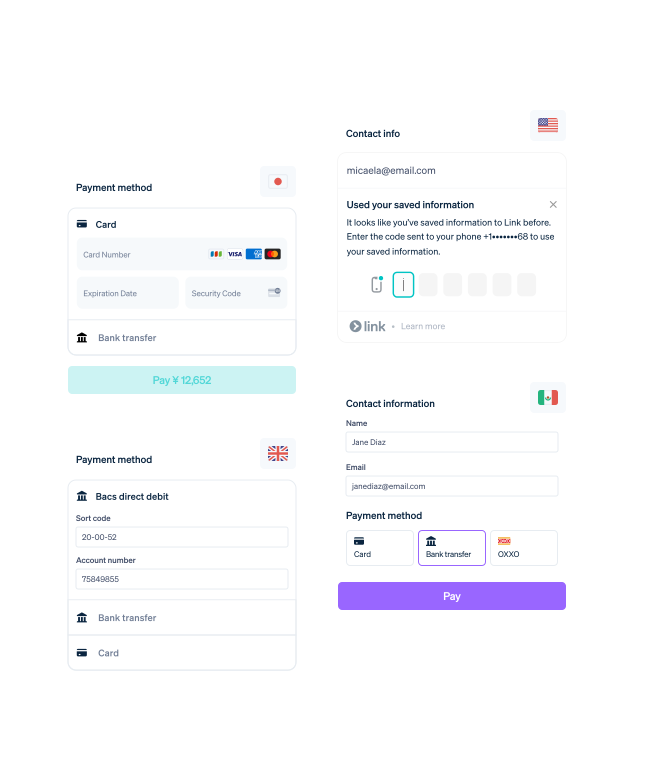
Credit: stripe.com
How Does Stripe Work?
Stripe connects your website or app with banks and card companies. When a customer pays, Stripe sends money to your bank. It makes sure the payment is safe and quick.
Stripe has easy tools for developers. It also has simple ways for people without tech skills.
Steps To Use Stripe
- Create a Stripe account online.
- Link your bank account to Stripe.
- Add Stripe payment options to your website or app.
- Start accepting payments from customers.
- Check your sales and reports on the Stripe dashboard.
Benefits of Using Stripe
Many businesses choose Stripe for good reasons. Here are some benefits:
- Easy to Use: Simple setup with clear instructions.
- Flexible: Works for any size business.
- Safe: Uses strong security to protect data.
- Fast Payments: Money goes to your bank quickly.
- Global: Accepts payments from many countries.
- Good Support: Help is available online anytime.
Who Should Use Stripe?
Stripe works well for many types of businesses. Here are some examples:
- Small online shops selling products
- Freelancers offering services
- Subscription services like magazines or clubs
- Large companies selling worldwide
- Nonprofits accepting donations
If you sell online and want a simple payment tool, Stripe is a good choice.
How Stripe Helps Your Business Grow
Stripe gives you tools to manage your money well. You can see reports on sales and customers. This helps you understand your business better. You can also use Stripe to make special deals like discounts or subscription plans.
With Stripe, your customers can pay in many ways. This makes it easier for them to buy from you.
Stripe Pricing
Stripe charges fees for each payment. Here is a simple table to explain costs:
| Service | Fee |
|---|---|
| Online card payments | About 2.9% + 30 cents per transaction |
| In-person payments | Lower fees, about 2.7% + 5 cents |
| International cards | Extra 1% fee |
| Currency conversion | Extra 1% fee |
There are no monthly fees. You pay only when you get paid. This is good for new or small businesses.
Stripe vs Other Payment Tools
There are many payment tools available. How does Stripe compare? Here is a quick look:
| Feature | Stripe | Other Tools |
|---|---|---|
| Setup | Fast and easy | Some are slow or complex |
| Fees | Transparent, pay per use | Some have monthly fees |
| Payment Options | Many types supported | May support fewer methods |
| Security | High-level protection | Varies by provider |
| Global Reach | Works worldwide | Limited in some countries |
Stripe is a strong choice for many online businesses.
How to Get Started with Stripe
Starting with Stripe is simple. Follow these steps:
- Go to the Stripe website.
- Sign up with your email and business info.
- Link your bank account for payments.
- Connect Stripe to your website or app.
- Test payments to make sure it works.
- Start selling and accepting payments.
If you need help, Stripe has guides and support teams ready.
Frequently Asked Questions
What Payment Methods Does Stripe Support For Online Businesses?
Stripe supports credit cards, debit cards, digital wallets like Apple Pay, and bank transfers.
How Secure Is Stripe For Handling Online Payments?
Stripe uses strong encryption and fraud detection to keep payments safe and secure.
Can Small Businesses Easily Integrate Stripe On Their Websites?
Yes, Stripe offers simple tools and guides to help small businesses add payment options fast.
What Are The Fees For Using Stripe For Online Payments?
Stripe charges a small fee per transaction, usually around 2. 9% plus 30 cents.
Conclusion
Choosing the right payment tool is key for online business success. Stripe offers a safe, easy, and flexible way to accept payments. It works for small shops, freelancers, and big companies alike. With Stripe, you can accept many payment types and manage your sales easily. The fees are clear and fair, with no hidden costs.
If you want a trusted and simple payment solution, Stripe is a solid choice. It helps your business take payments smoothly and grow step by step.